Mint App Review: Mint Is Gone. Here is the Best Alternative

The Mint app is gone. If you opened the app and hit a dead end, you’re not alone. Intuit decided to wind down Mint and move users over to Intuit Credit Karma instead.
That shift matters because Credit Karma isn’t a 1:1 replacement. It can help you track accounts and spending. But many Mint users miss the parts that made budgeting feel simple, like clear monthly targets and category limits.
This guide is for former Mint users who want a clean next step. No drama. No “perfect app” promises. Just four strong alternatives, each picked for a different style of budgeting:
- Best free option (if you don’t want another bill)
- Best for beginners (if you want it to feel easy fast)
- Best for automation (if you want rules and less hands-on work)
- Best for manual budgeting (if you want full control, every dollar)
By the end, you’ll know what to try first, and what tradeoffs to expect.
The Mint app is gone: what happened (and when)
Intuit didn’t “pause” Mint. It ended it and pointed Mint users to Intuit Credit Karma instead. The change rolled out in phases, so people saw the shutdown prompts at different times.
Mint shutdown timeline
- October 31, 2023: Intuit Credit Karma announced it was “reimagining Mint” inside Credit Karma and said migration would be phased.
- Late 2023: Many users started seeing in-app notices and emails telling them to move to Credit Karma (not everyone at once).
- Final shutdown: Mint later fully shut down in late March 2024. CNBC Select lists March 23, 2024, as the official shutdown date.
What happened to Mint users’ data/migration window
Intuit’s main path was: move your Mint data into Credit Karma (if you choose to). Reports quoting Intuit say users who transfer could bring over most account balances, historical net worth, and up to 3 years of transactions.
Two important “gotchas” Mint users ran into:
- Once you move your data to Credit Karma, you can’t access your Mint profile anymore.
- Intuit also said you’d have a limited window to download your Mint transaction data (including a short period after Mint features stopped working).
Why did Intuit shut down Mint?
Intuit didn’t frame this as “we’re killing budgeting.” It framed it as a platform decision. Instead of running Mint as its own product, Intuit chose to fold the “Mint-style” experience into Intuit Credit Karma and move users there.
Intuit’s strategy shift to Credit Karma
Intuit’s official message was simple: Mint is going away, and Credit Karma is where Mint users should go next. They described this as “reimagining Mint” inside Credit Karma, with a phased migration.
In interviews and reporting, the “why” comes down to focus and scale. Bloomberg reported Intuit was winding down Mint and pushing users to Credit Karma, which it acquired in 2020.
Intuit’s CEO also said the company decided to be “one platform” and that Mint served a smaller cohort than what they want to serve through Credit Karma. (His point: they can’t replace Mint exactly as it was.)
The key feature gap: budgeting vs spending awareness
Here’s the part that matters to actual Mint users: Credit Karma was not positioned as a full Mint-style budgeting app. Intuit (via a spokesperson) told CNBC that Credit Karma “does not currently provide budgeting features the same way that Mint has in the past.”
Some Mint-like features did carry over (like spending and net worth tracking). But multiple reports noted a big missing piece: you lose the ability to set monthly and category budgets in the new Credit Karma experience. That’s why so many people immediately started searching for alternatives.
What app replaced Mint? (Credit Karma, explained)
Intuit’s “official” Mint replacement is Intuit Credit Karma. It can cover some of the basics (spending, cash flow, net worth). But it is not built as a full-fledged budgeting app like Mint.
What Credit Karma does well
- Credit monitoring is still the core. Credit Karma gives you VantageScore 3.0 credit scores using data from Equifax and TransUnion.
- Mint-style tracking (to a point). Credit Karma has said Mint users can track net worth and monitor spending, transactions, and cash flow, including views that compare month to month and by category.
- Recommendations are “the business model.” Credit Karma analyzes your data to recommend financial products (like cards and loans) and gets paid by partners when users sign up.
What Credit Karma doesn’t replicate from Mint?
- No real budgeting limits. Credit Karma doesn’t let you set the kind of monthly or category budget limits that Mint users relied on.
- Less control for hands-on users. Investopedia notes that Credit Karma lacks key budgeting tools and also has limits, such as not allowing certain manual entries (e.g., manual debt entry).
- The move can be one-way. Intuit has said that once you move your Mint financial data to Credit Karma, you can’t access your Mint profile anymore (and downloading data has a limited window).
Who should still use Credit Karma anyway?
Credit Karma can still be a smart pick if you want:
- A free place to keep an eye on credit, plus a basic money view.
- Spending and net worth tracking, but you don’t need strict budgets with category limits.
- A tool that nudges you toward “next steps” (like product recommendations), and you’re fine seeing those offers.
What to look for in a Mint alternative
Mint worked because it was simple: connect accounts, auto-track spending, and see your month in one place. When you pick a replacement, focus on the few features that prevent daily “budget babysitting.”
If you are still working on organizing your finances, our money tips page can help you stay on track.
Account syncing reliability + institutions supported
- Make sure the app connects to your bank and credit cards. This matters more than fancy charts.
- Expect syncing to be imperfect sometimes. Even top apps get complaints about connection issues.
- Bonus points if it supports easy import (CSV) so you can fix gaps fast.
Rules, auto-categorization, recurring transactions
These are the time-savers Mint users miss most.
- Auto-categorization cuts down on manual edits.
- Rules help keep categories consistent (for example, always tag “Starbucks” as Dining).
- Recurring bill detection helps you spot subscriptions and predictable expenses.
Net worth + investments
If you used Mint for the “big picture,” don’t skip this.
- Mint lets users track net worth by syncing accounts.
- Some replacements track investments and net worth well, even if their budgeting tools are weaker.
Privacy/monetization model: free vs paid
- Free apps often make money through ads and product offers. Credit Karma, for example, earns revenue when users sign up for loans or cards promoted on the platform.
- Paid apps usually make money from subscriptions, not offers.
Best Alternatives to the Mint Budgeting App

Mint used to be the “all-in-one” default. Now, the best replacement depends on how you budget. Below are four strong picks, each matched to a common Mint user need (free, beginner, automation, manual control).
Best Free Alternative: Empower Personal Dashboard
Best for: People who want a free money dashboard for spending + net worth.
Why it’s a good Mint backup: It’s strong at “see everything in one place,” especially if you care about investments and net worth.
Cost: Free
What you get
- Net worth tracking and account aggregation.
- Cash flow + budgeting views.
Watch-outs (important)
- It’s not built for strict “category budget limits” like Mint. Empower’s own support notes limit setting specific budgeting goals
Best for Beginners: Quicken Simplifi
Best for: People who want Mint-like clarity fast, without a steep learning curve.
Why it’s beginner-friendly: Quicken highlights guided onboarding and says you can be up and running in about 30 minutes.
Price (as of Jan 2026): $2.99/month billed annually (promotional pricing is common).
What you get
- A “Spending Plan” that tracks bills, income, goals, and planned spending in one monthly view.
- Real-time “left this month” style tracking (very Mint-like for many users).
Watch-outs
- It’s a subscription, even if the price is relatively low.
Best for Automation: Monarch Money
Best for: People who want less manual cleanup (rules, auto-categorizing, cleaner reports).
Why it wins on automation: Monarch auto-categorizes transactions, and you can create rules that rename merchants, recategorize, tag, or hide transactions automatically.
Price (as of Jan 2026):** $14.99/month or $99.99/year ($8.33/month).
What you get
- Strong rules system for ongoing “set it once” cleanup.
- Budgeting + planning features, plus goal tracking and custom reporting.
Watch-outs
- No permanent free tier (only trial).
Best for Manual Budgeting: YNAB (You Need A Budget)

Best for: People who want hands-on control and don’t mind being involved.
Why it’s “manual” (in a good way): YNAB is built around zero-based budgeting—assigning every dollar a job. That means you actively decide where money goes.
Price (as of Jan 2026): $14.99/month or $109/year ($9.08/month)—free 34-day trial.
What you get
- A clear, structured method (“give every dollar a job”) that reduces guesswork.
- Zero-based budgeting approach (digital “envelope style”).
Watch-outs
- It’s not passive. You’ll do more decision-making than you did in Mint.
Side-by-side comparison table
If you liked Mint, you probably want three things: solid account syncing, clean categories, and a “one-screen” view of your month. This table helps you pick fast. (Prices can change, so I’m listing what each company publishes as of January 24, 2026.)
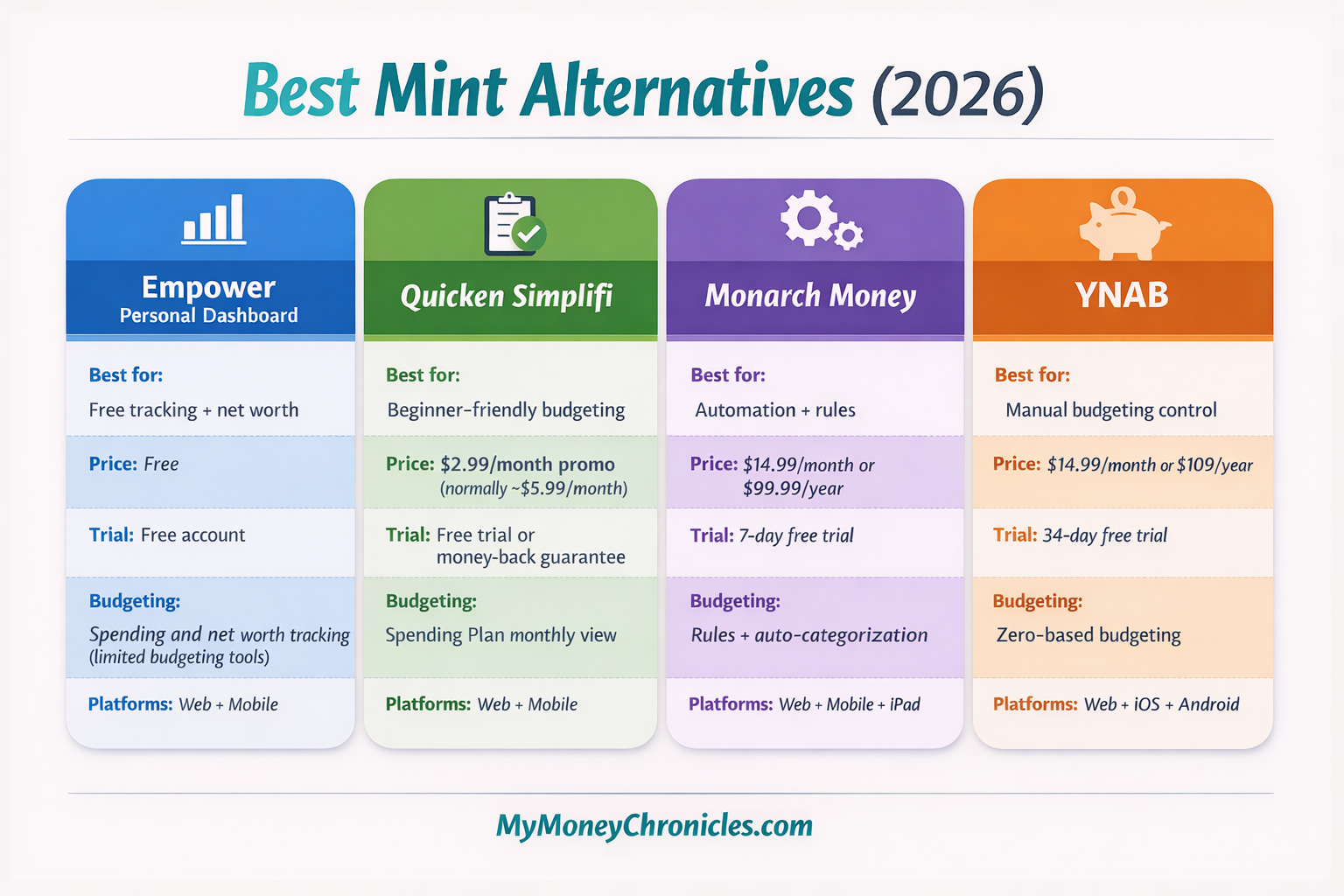
If you want the simplest “Mint-like” transition, Simplifi is usually the best place to start. If you want the most hands-off cleanup over time, go with Monarch. If you want strict control: YNAB. If you want free dashboards: Empower.
If you’re trying to improve your finances overall, you might also like these side hustle ideas to increase your income.
How to switch from Mint without losing your mind
The goal isn’t a perfect “Mint clone.” It’s a clean restart with enough history to make reports useful. Do this in two steps: save what you can, then set up the new app to stay low-maintenance.
Export what you can
- If you already exported Mint files (CSV/JSON), save them now in a folder you won’t lose (Drive/Dropbox).
- If you don’t have Mint exports anymore, pull your bank history. Some banks only let you download a limited window (often around 90 days), and you may need statements for older data.
- Split long histories early. Large “all accounts in one file” uploads can fail. Monarch specifically recommends breaking large files up (often by account, and then by date range if needed).
Import options by app
- Monarch Money (web only): Use the “Move from Mint to Monarch” upload flow. Don’t upload everything at once if you have lots of accounts/transactions. CSV imports can’t be undone, so test with a smaller file first.
- Quicken Simplifi (web only): You can import via CSV, and there’s a specific “Mint” import option. Simplifi also notes that Mint imports may be limited to 10,000 transactions per import so that you may need multiple files.
- YNAB: YNAB has a “Migrate from… Mint” option that can bring over categories and average spending amounts, and it creates a new budget during the process.
- Empower Personal Dashboard: Empower does not support importing your Mint history. You’ll link accounts and start tracking from there.
First 7 days setup” checklist
- Day 1: Connect accounts, then fix obvious duplicates and rename messy merchants.
- Day 2: Lock in a short category list (10–20 categories max at first).
- Day 3: Add rules/automation (or pick your budgeting method in YNAB).
- Day 4: Review recurring bills and subscriptions; tag them.
- Day 5: Check that income is categorized correctly (this breaks budgets fast).
- Day 6–7: Do a quick weekly review: recategorize, confirm balances, and clean up anything that keeps repeating.
Mint is gone, but you’re not stuck. The right replacement depends on how you actually budget day to day. If you want a free dashboard and net worth tracking, start with Empower. If you want something simple that feels familiar fast, Quicken Simplifi is the easiest path for many former Mint users. If you want the least ongoing cleanup, Monarch Money is built for rules and automation. And if you want full control and a real budgeting system, YNAB is the best pick for hands-on budgeting.
Budgeting apps help you track your money, but increasing your income can make an even bigger difference. Here are some apps that pay real money.
Pick one app, set it up this week, and give it seven days before you judge it. Consistency matters more than features.
Like My Money Chronicles? Add us as a Preferred Source on Google to see more of our content in your search results.

Jason Butler is the founder of My Money Chronicles and an SEO consultant with over a decade of blogging experience. Since 2015, he has earned income through side hustles including blogging, eBay flipping, affiliate marketing, and freelance work while paying off over $64,000 in debt. His work has been featured in Forbes, Discover, Investopedia, and Yahoo Finance.